Business & growth
Full-Stack File Storage SDK: One API From Next.js Server to React Browser
- Files SDK
- Next.js
- React
- File upload
- Developer tools

Full-stack file storage usually means three different implementations: a server route for uploads, a client form with its own error handling, and a dashboard that talks to yet another API. Files SDK's latest release treats that as one problem—with one storage API from server to browser.
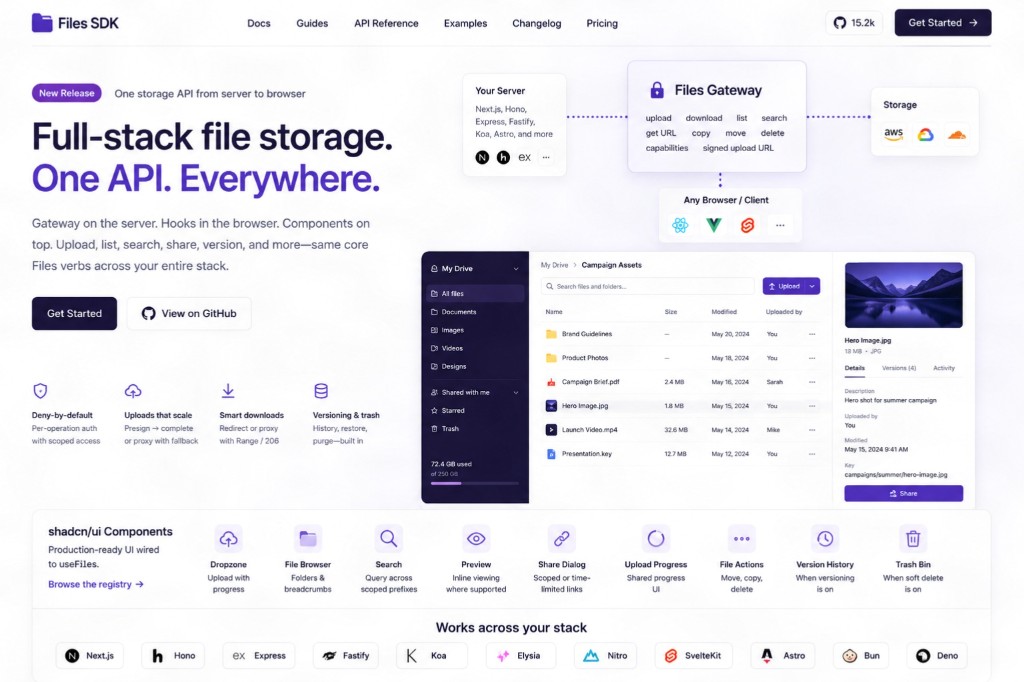
If you are evaluating **full-stack file storage SDK** options for a Next.js app, a client portal, or an internal admin tool, this release is worth a look. It is less a thin wrapper around S3 and more a **portable file layer**: gateway, browser client, framework adapters, and optional shadcn/ui components wired to the same verbs underneath.
What changed: one gateway, many surfaces
The release centers on **`@files-sdk/api`** as the files gateway. Mount one endpoint and you expose a consistent set of operations: upload, download, list, search, get URL, copy, move, delete, capabilities, and signed upload URLs.
On the **server**, bindings mount the same gateway shape across stacks teams already run: **`@files-sdk/next`**, **`@files-sdk/hono`**, plus Express, Fastify, Koa, Elysia, Nitro, SvelteKit, Astro, Bun, and Deno adapters. Web-native handlers aim to work across Node and edge runtimes where the platform allows.
On the **client**, **`createFilesClient`** is framework-agnostic. **`useFiles`** ships for React, Vue, and Svelte with upload progress, errors, **`useList`**, **`useFile`**, and **`useSearch`**. If your Files instance uses **`versioning()`** or **`softDelete()`**, the client and hooks pick up version history, restore, trash listing, restore trashed files, and purge—scoped auth still applies.
Why split upload stacks fail in production
Most teams start simple: a Next.js route handler that accepts multipart form data, plus a React dropzone that posts to it. That works until you need presigned uploads, range downloads, trash bins, or different permissions per folder prefix.
Without a **file storage API gateway**, each feature becomes a one-off route. Auth rules drift. The admin file browser calls `/api/files/list` while the public upload form hits `/api/upload` with different validation. Mobile clients get a third shape. On-call engineers debug three code paths for the same bucket.
A unified gateway does not remove policy decisions—it forces them into one place with deny-by-default semantics per operation.
Auth and transport: deny-by-default, proxy-aware
Auth is **deny-by-default per operation**, with key prefixes, expiries, read-only constraints, and origin allowlists. Downloads can redirect to storage or **proxy stream** through your server when you need control.
Proxy mode supports **Range / 206** responses and aborts upstream reads when the client disconnects—important for large files and flaky mobile networks, not just desktop browsers.
Uploads can use **keyless presign → complete** token flows, with a proxy fallback when the server must stay in the path (virus scan, metadata extraction, audit logging). That pattern matters for B2B portals where you cannot expose raw bucket credentials to the browser.
Server adapters: same gateway, your framework
For **Files SDK Next.js** teams, the goal is mount-and-go: one route exposes the full verb set instead of growing `/api/upload`, `/api/files/[id]`, and `/api/files/search` by hand.
Hono, Express, Fastify, Koa, Elysia, Nitro, SvelteKit, and Astro bindings share the gateway contract—useful if your marketing site, API service, and worker scripts all touch the same storage backend but run on different runtimes.
Pick the adapter that matches deployment (Node vs edge), then configure auth once at the gateway. Client code stays the same whether the browser talks to Next on Vercel or Hono on a VPS.
Browser clients and React file upload hooks
**`createFilesClient`** handles typed calls from any front end. **`useFiles`** and related hooks add the UI lifecycle teams expect: progress events, error surfaces, list refresh after upload, single-file fetch, and search.
When **`versioning()`** is enabled, version history and restore show up in the client API—not a separate admin-only REST layer. **`softDelete()`** adds trash listing, restore, and purge with the same scoped tokens you use for normal reads and writes.
That matters for agency and product teams shipping **React file upload hooks** in client dashboards: you do not fork behavior between "user-facing upload" and "staff file browser." Same hooks, stricter scopes.
shadcn/ui registry: UI wired to useFiles
The release ships a **shadcn/ui registry** tied to **`useFiles`**, so components are installable rather than copy-pasted from a demo repo. Available pieces include:
- **dropzone** — drag-and-drop upload with progress
- **file browser + breadcrumbs** — folder navigation
- **search** — query across scoped prefixes
- **preview** — inline file viewing where supported
- **share dialog** — time-limited or scoped links
- **upload progress** — shared progress UI
- **file actions** — move, copy, delete with auth checks
- **version history** — when versioning is on
- **trash bin** — when soft delete is on
For teams already on shadcn, this shortens the gap between "storage works in Postman" and "storage works in the product." The components inherit the same auth and error model as the hooks—not a parallel UI kit with its own assumptions.
When a full-stack file storage SDK beats roll-your-own
Consider Files SDK (or a similar unified layer) when:
- You need **browser uploads and server-side processing** on the same key namespace
- **Presigned upload URLs** and proxy uploads must both exist without two codebases
- **Versioning or trash** is a product requirement, not a backlog ticket
- Multiple frameworks (Next.js admin + Hono API) share one bucket policy
- You want **shadcn-ready UI** without maintaining a custom file manager
Stick with minimal custom routes when uploads are tiny, public, and never listed or searched—rare for client portals and SaaS dashboards.
Implementation checklist for web teams
- Mount **`@files-sdk/api`** (or framework binding) on one gateway path
- Define **deny-by-default** rules per operation with key prefixes and expiries
- Choose **redirect vs proxy** downloads based on audit and Range needs
- Wire **`createFilesClient`** in the browser with origin allowlists enforced server-side
- Add **`useFiles`** (or Vue/Svelte equivalents) to forms and admin views
- Install shadcn registry components only for surfaces you ship—dropzone first, browser second
- Test **presign → complete** and proxy fallback on slow networks
- If using **`versioning()`** or **`softDelete()`**, verify trash and restore in the same UI your users see
What this means for agencies shipping client portals
Client upload portals, proposal attachments, and campaign asset libraries all hit the same wall: storage is "done" in day one, then every new permission model becomes a custom route. A **full-stack file storage SDK** pushes upload, list, search, and delete into one vocabulary—gateway on the server, hooks in React, optional shadcn UI on top.
That does not replace bucket choice (S3, R2, etc.) or backup policy. It replaces the spaghetti of mismatched endpoints that usually sits on top.
The takeaway
Files SDK's full-stack release is the **one-storage-API** bet: **`@files-sdk/api`** as gateway, framework adapters from Next.js to Hono to Astro, **`createFilesClient`** and **`useFiles`** in the browser, and shadcn components for dropzone, browser, search, preview, share, versions, and trash—same core Files verbs throughout.
If you are standardizing uploads across a Next.js product and tired of reconciling three upload implementations, start at the gateway and work outward. If you want a second pair of eyes on file upload architecture for a client portal or internal tool, get in touch.